

What internal linking does for a website
An internal link takes a visitor from one page on your site to another page on the same site. The link may appear inside an article, in navigation, in breadcrumbs, in a related-content area or somewhere else that genuinely helps the user.
The SEO value comes from structure. Google says links help it discover pages and understand relevance. It also recommends descriptive anchor text and says every page you care about should have a link from at least one other page on your site. There is no magic ideal number of links for a page.
That means the real job is not “add five internal links.” The job is to build useful routes between pages that belong together.
Link because the destination helps the reader at that point in the page. SEO benefit should support that decision, not replace it.
1. Set page ownership before you build links
A strong website internal link strategy starts with page ownership. Each important search intent should have one main URL. If two pages are trying to rank for the same job, internal linking can make the confusion worse because you keep sending mixed signals about which page matters.
For this site, this article owns informational intent around internal linking SEO strategy. The commercial on-page SEO optimization page owns the service intent. This article can explain the method and link to the service page when a reader needs implementation support. It should not turn into a second sales page for the same commercial keyword.
Map one primary purpose to each URL
Write down the page type, main topic, intent and ideal next step. Service pages, category pages, blog guides and local pages should not all compete for one broad phrase. If the mapping is unclear, review the keyword research and intent mapping process before adding more links.
2. Build a simple hierarchy people can understand
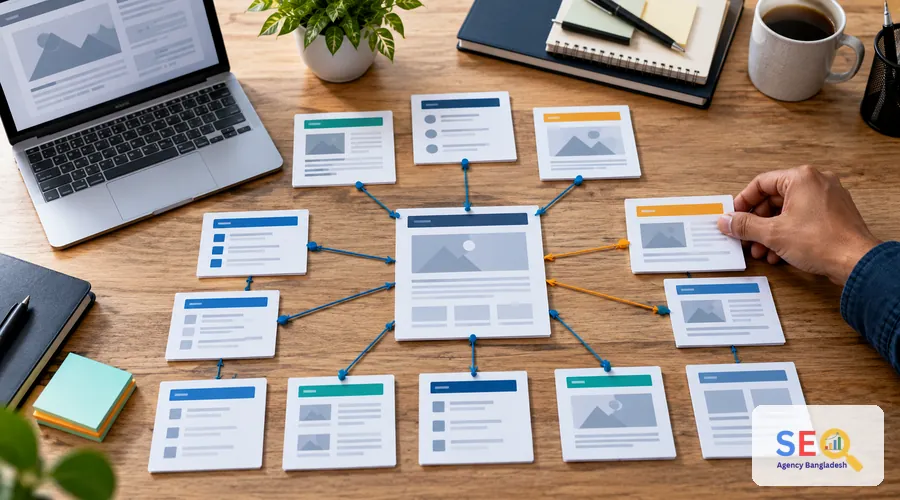
You do not need a complicated SEO diagram. Start with the main sections of the site and show how supporting pages relate to them. A broad page can act as a hub. More specific pages can answer narrower questions. Links should work in both useful directions.
A service hub might link to a detailed guide that helps a buyer understand a problem. That guide can link back to the relevant service when the reader reaches the implementation stage. Related guides can also link to each other when the connection is real.
Use topic clusters as an organizing method, not a rule
Topic clusters are a practical SEO framework, not a special Google requirement. The useful part is the logic: group related content, give the broad topic a clear home, and connect supporting pages so users do not hit dead ends.
3. Choose source pages and target pages deliberately
Every internal link has a source page and a target page. The best opportunities usually appear where the source already discusses a topic that the target explains in more depth.
Good source pages
Look for existing pages with relevant traffic, backlinks, strong visibility, useful evergreen content, or a clear relationship to the target page. An older article may be a better source than a newly published page because it already has context and visitors.
Good target pages
Prioritize pages that matter to the user journey: core service pages, useful category pages, key guides, important product or service pages, and new content that otherwise has few internal paths pointing to it.
Do not link every strong page to every commercial page. Relevance matters. A link should make sense even if search engines did not exist.
4. Write anchor text that explains the destination
Anchor text is the clickable wording of a link. Google recommends wording that is descriptive, reasonably concise and relevant to both the current page and the destination.
That does not mean every link to one URL should use the same exact keyword. Natural variation is healthier and more readable. The sentence around the link also supplies context.
| Weak anchor | Better anchor | Why it is better |
|---|---|---|
| Click here | on-page SEO checklist | The reader knows what the destination contains. |
| Learn more | technical SEO checklist | The topic is clear before the click. |
| SEO services Bangladesh SEO services | on-page optimization support | It sounds natural and avoids forced keyword repetition. |
If an image itself is a link, its alt text can also provide link context. Keep that alt text descriptive rather than stuffing it with target keywords.
5. Put links where users can actually use them
A contextual link should sit close to the idea it supports. Do not collect unrelated links at the end of a paragraph just to increase the count. Links in menus, breadcrumbs and related-content modules can help navigation, while body links help readers move directly to a useful next explanation.
Use crawlable HTML links
Important links should use a normal <a href="..."> link that resolves to a real URL. Google can crawl standard anchor links reliably. Do not depend on a clickable <span> or a JavaScript-only event for a page you need search engines and users to reach.
Avoid link chains inside one sentence
Several linked words packed together are hard to scan and give each destination very little surrounding context. Space links naturally through the copy and explain why each destination is useful.
6. Find orphaned and underlinked pages
An orphan page has no discoverable internal route from the rest of the site. A page can also be technically linked but still be buried so deeply that users rarely reach it.
For important URLs, check how many useful internal paths lead in, where those links appear, and whether they come from pages with a real topical relationship. Google’s guidance is straightforward: every page you care about should receive a link from at least one other page.
A practical audit workflow
- Export or crawl the site’s internal links.
- List important service, category, product and evergreen content pages.
- Identify pages with no internal inlinks or very few relevant inlinks.
- Find older pages that already discuss the same subject.
- Add useful contextual links where they genuinely help.
- Check that the target URLs return the intended page without unnecessary redirect hops.
- Repeat the review after major content additions or site restructuring.
If the crawl reveals wider indexing, architecture or redirect problems, move those findings into a broader technical SEO review rather than trying to solve everything with internal links.
7. Connect supporting content to the page that owns the main topic
A topic cluster works when each page has a distinct job. The hub covers the broad subject. Supporting pages answer narrower questions. Internal links help a reader move between the overview and the detail.
On SEO Agency BD, for example, the commercial on-page optimization page can be supported by informational content such as the on-page SEO checklist and this internal linking guide. Each article keeps its own informational intent while pointing readers toward the broader implementation page when appropriate.
This is stronger than publishing several near-duplicate service pages with slightly different keyword wording. The cluster becomes a useful learning path instead of a set of pages competing with one another.
8. Example: internal linking for a Bangladesh business site
Imagine a Dhaka-based service company with a homepage, six core service pages, a blog and several useful guides. The mistake would be to link every article to every service using the same sales phrase.
A cleaner structure starts with relevance. A guide about choosing a service can link to that specific service page. A pricing explainer can link to the service and to a more detailed cost article. A technical guide can link to the relevant audit or optimization page. Each service page can link back to two or three supporting resources that answer common buyer questions.
The same idea works for a Bangladesh ecommerce site. Category pages link to meaningful subcategories and useful buying guides. Product guides link to the categories or products they genuinely discuss. Blog posts should not become a wall of exact-match product links.

9. A 12-step internal linking checklist
- Assign one main intent to every important page. Do not let two URLs own the same job without a clear reason.
- Identify the main hubs. These may be service, category, product-family or evergreen guide pages.
- Group related supporting pages. Keep the relationship useful, not forced.
- Link hubs to relevant detail pages. Help users reach the next level of information.
- Link supporting pages back to the correct hub. Make the broader context easy to find.
- Add cross-links only where topics genuinely overlap. Do not connect pages merely because both mention SEO.
- Use descriptive anchor text. The reader should understand the destination before clicking.
- Vary wording naturally. Do not repeat one exact-match phrase site-wide.
- Use standard crawlable links. Important URLs should be reachable through real anchor elements with href values.
- Find orphan and underlinked pages. Give important pages at least one useful internal path.
- Check broken links and redirects. Point internal links to the intended live destination where practical.
- Review after publishing new content. New pages need links in, and older pages may need a new useful link out.
Internal linking mistakes that weaken the structure
The biggest problems are usually not subtle. A site publishes many pages without assigning topic ownership. New articles receive no links from older content. Every anchor uses the same exact phrase. Related-content widgets show random posts. Important links depend on script-only controls. Or the site adds so many links that the page becomes harder to read.
No fixed link quota: Google explicitly says there is no magical ideal number of links for a page. Use enough links to help people navigate and understand the subject. If the page feels overloaded, reduce them.
Also separate internal linking from link building. Internal links connect pages within your own site. Backlinks come from other websites. If you are working on external authority, use a separate link building guide for Bangladesh rather than mixing the two tactics.
Internal linking SEO questions
How many internal links should a page have?
There is no universal number. Google says there is no magical ideal link count. Add links when they help users move to a relevant page, then remove links that make the page noisy or repetitive.
Should I use the exact keyword in every internal anchor?
No. Use descriptive wording that fits the sentence. Natural variations are easier to read and still tell people and search engines what the destination is about.
What is an orphan page?
An orphan page has no internal link leading to it from the site’s crawlable page network. Important orphan pages should be connected from relevant pages so users and search engines can discover them.
Are topic clusters required for SEO?
No. Topic clusters are an SEO planning framework, not a special Google requirement. They are useful when they help you create a logical hierarchy and connect related pages clearly.
Should internal links open in a new tab?
Usually there is no need. Keep normal internal navigation predictable. Open a new tab only when there is a clear user-experience reason, not as an SEO tactic.
Sources and further reading
Need help cleaning up your internal link structure?
If the audit shows unclear page ownership, weak contextual links, orphan pages or a messy content hierarchy, SEO Agency BD can review the structure and implement the on-page fixes.